

Almost every lab has tests it runs together. A drinking water sample gets pH, Conductivity, Turbidity, Nitrate and E. coli. Ticking five boxes on every sample is slow, and sooner or later someone forgets one.
An Analysis Profile is a named set of Analysis Services. Select it when registering a sample and SENAITE adds all its services at once.
What a profile holds
Profiles live under Setup, Analysis Profiles. The fields:
- Name and description.
- Profile Keyword: an optional short code. If set, it has to be unique.
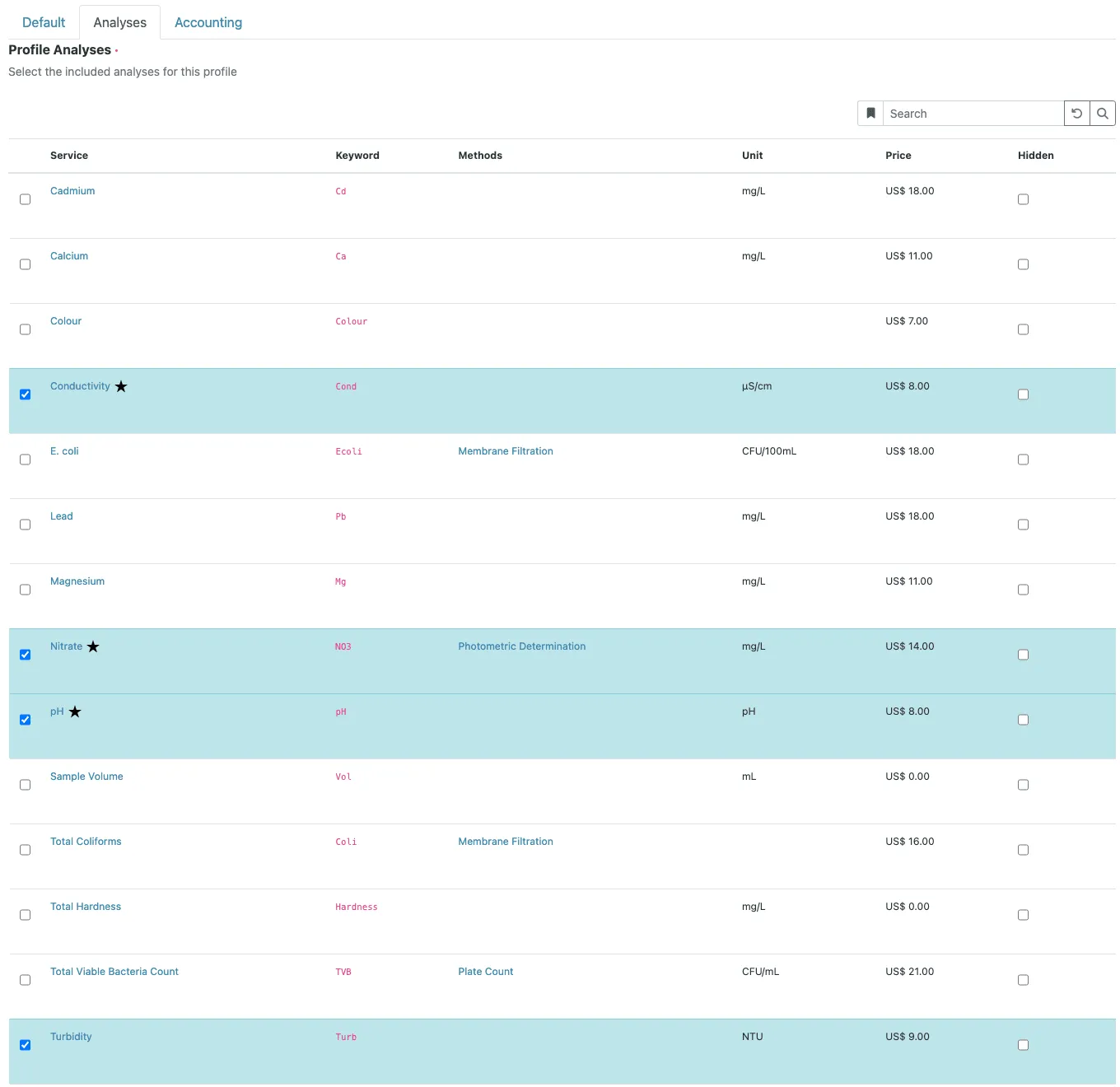
- Profile Analyses: the services in the profile. Each one can be marked Hidden, which keeps that analysis off the published report by default. The lab can still change this per analysis on the sample.
- Commercial ID: the article number in your accounting system.
- Use analysis profile price, with a price and VAT: the profile is charged as a package instead of the sum of its services. The price only shows once pricing is switched on in the setup (Accounting tab).
- Sample types: restricts where the profile is offered. A profile limited to drinking water does not appear when the clerk registers a wastewater sample. Leave it empty and the profile is offered for every sample type.
Profiles can also be created inside a client. Such a profile is only offered for that client’s samples, which keeps panels that were agreed with one customer out of everybody else’s picker.
What a profile does not do: it carries no accreditation flag (that sits on each service) and it does not structure the report. Reports group results by category, not by the profile the analyses came from.
How it behaves on a sample
A sample can carry several profiles. If two of them contain the same service, the analysis is added once. If a service in the profile has a calculation, SENAITE adds the services the calculation depends on as well.
The profile is applied when it is selected. After that, the sample holds ordinary analyses. Two consequences follow:
Editing a profile does not touch existing samples. Adding Fluoride to the drinking water profile affects samples registered from then on. Samples already in the lab keep the analyses they were created with.
Removed analyses can come back. Say a clerk removes Turbidity from a sample through Manage Analyses because the customer did not order it. The profile stays assigned. If someone later changes the profile selection on that sample, for instance adds a second profile, SENAITE adds every service of the selected profiles that the sample does not have, Turbidity included.
A worked example
A water lab sets up three profiles:
| Profile | Services | Sample types |
|---|---|---|
| Drinking water basic | pH, Conductivity, Turbidity, Nitrate, E. coli | Drinking water |
| Metals | Pb, Cu, Ni, Cd | Drinking water, Groundwater |
| Wastewater discharge | pH, COD, Ammonium, Total phosphorus | Wastewater |
The basic panel is offered at a package price, so the invoice charges that price instead of five individual ones. A drinking water sample that also needs metals gets both profiles, nine analyses in total. The wastewater profile never shows up for drinking water samples, which removes a whole class of registration mistakes.
The trap: the profile that is almost right
A profile that almost fits invites people to select it and then add or remove a service by hand. Do that often enough and the “routine” samples are all individual, the profile price no longer matches the work, and the removed analyses start coming back as described above.
If the same adjustment happens every week, it is a second profile. If it happens once, it is a manual change and does not need a profile at all.
Keeping profiles healthy
- Name profiles after what the customer orders (“Drinking water basic”), not after lab shorthand.
- Use the sample type restriction. It is the cheapest way to prevent a wrong profile on a sample.
- Put customer-specific panels into the client, not into the shared setup.
- Review the list once a year and deactivate what nobody selects any more. Deactivated profiles stay attached to the samples that used them.
Profiles decide which analyses a sample gets. Whether their results are acceptable is the job of specifications.