
A result of 12.3 µg/L lead tells the client less than
12.3 ± 1.5 µg/L. The second form says how far the last digit
can be trusted, and ISO/IEC 17025 expects a laboratory to know
that figure for its methods. SENAITE can carry it on every
numeric result. This post covers how it chooses the value, how
it prints it, and one thing people often assume it does,
although it does not.
Where the ranges live
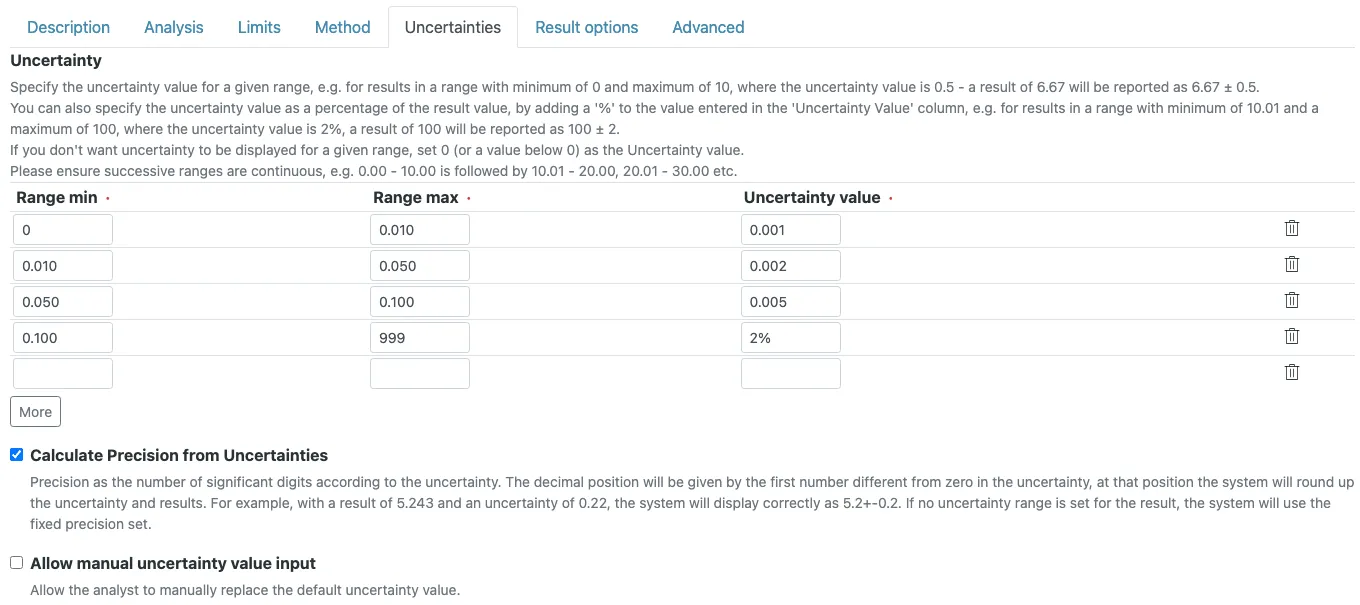
Uncertainties are set on the Analysis Service, on the
Uncertainties tab. The Uncertainty field is a table with
three columns: Range min, Range max and Uncertainty value.
Each row says: a result in this range carries this uncertainty.
A lead service in µg/L might look like this:
| Range min | Range max | Uncertainty value |
|---|---|---|
0 | 5 | 0.5 |
5.01 | 20 | 1.5 |
20.01 | 1000 | 8% |
The value is either absolute, in the unit of the result, or a
percentage of the result when it ends with %. A result of
12.3 picks up ± 1.5. A result of 50 picks up 8 % of 50,
so ± 4.
How SENAITE picks a row
The rule in the code is short. SENAITE walks the rows in order
and takes the first one where Range min <= result <= Range max.
Both ends are inclusive. Three consequences follow, and all
three show up in real setups:
- Overlapping rows. If one row ends at
5and the next starts at5, a result of exactly5gets the uncertainty of the row listed first. - Gaps. With rows
0 to 5and5.01 to 20, a result of5.005matches no row and is reported without uncertainty. Choose the boundaries at the precision the method actually reports, so a result can never fall between them. - No uncertainty wanted. A value of
0, or below0, suppresses the uncertainty for that range. This is cleaner than leaving a gap.
Only numeric results get an uncertainty. Text results, selection lists and dates never do.
Fixed when the sample is registered
An analysis copies the settings of its service when the sample is registered, and the uncertainty ranges travel with it. If you correct a range on the service next month, samples registered before the change keep the old ranges. That is right for traceability, but it surprises labs that fix a typo and expect open samples to follow.
Letting the analyst enter it
Some methods produce their own uncertainty per measurement, for
example from counting statistics or from the instrument
software. For those, turn on Allow manual uncertainty value input. Results entry then gets a +- input next to the result.
A value entered there replaces the range lookup for that
analysis; if the analyst leaves it empty, the ranges apply as
before.
Rounding result and uncertainty together
By default a service rounds its results to a fixed number of
decimals (Precision as number of decimals). With Calculate Precision from Uncertainties turned on, the uncertainty decides instead: it is
rounded to its first significant digit, and the result is
rounded to the same decimal position.
An example with a 2% range: a result of 1.751 has an
uncertainty of 0.03502. Rounded to one significant digit that
is 0.04, so the result is shown as 1.75 ± 0.04. The stored
result stays 1.751; only the display changes.
If the analyst entered the uncertainty by hand, SENAITE keeps the digits that were typed instead of rounding them away.

Where no uncertainty is shown
Below the Lower Limit of Quantification (LLOQ) and above the
Upper Limit of Quantification (ULOQ), SENAITE shows no
uncertainty at all. A result outside the quantifiable range is
displayed as Not detected, Detected but < LLOQ or > ULOQ,
and an uncertainty next to such a statement would mean nothing.
The same applies to results entered as a detection limit, such
as < 0.5. The limits are covered in
the post on detection limits.
On the report
The default report templates print the uncertainty next to the
result as [± 1.5], for every result that has one. The value
is formatted by the same rules as in the sample view.
What the uncertainty does not do
SENAITE does not use the uncertainty to decide whether a result
meets its specification. The out-of-range check compares the
bare result with the Min and Max of the
specification.
A result of 10.4 ± 1.5 against a maximum of 10 is flagged as
out of range, even though its interval reaches below the limit.
How to treat such a result is a decision rule. ISO/IEC 17025
(clause 7.8.6) asks the laboratory to define one and apply it
consistently when it states conformity. SENAITE offers one tool
for it: the Min warn and Max warn columns of the
specification, often called shoulders. With a Max warn of
11.5, the result 10.4 is still out of range, but it is
marked Result in shoulder range with its own icon. That tells
the verifier the rule applies and the result needs a judgement
rather than an automatic rejection. Derive the shoulder width
from your uncertainty at the limit, and write the rule down in
your procedures, because SENAITE will not apply it for you.
Before you configure
- Take the ranges from your own validation and QC data. A supplier data sheet is a starting point, not the performance of your method in your lab.
- Decide per method between absolute and percentage values. Near the lower end of the working range, absolute values usually describe the method better; at higher concentrations a percentage often does. Mixing both across rows of one service is supported.
- Write the boundaries without gaps, at the precision the method reports.
- Decide whether results near a limit need a shoulder in the specification, and agree on the rule that goes with it.